Every recipe you cook from, kept on your iPhone
Paste a link and see the recipe before you save. Find it again by ingredient, tag or title, cook from a screen that stays awake, and export it any time.
Free with no limits, no account, no ads
Pro $4.99 a month or $14.99 once
What you get
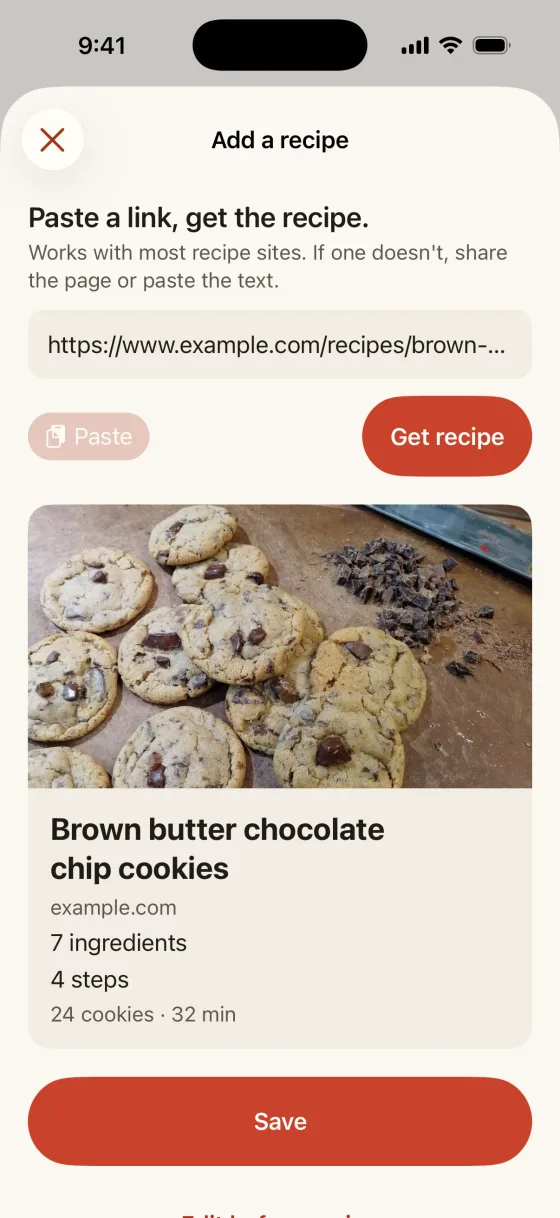
Paste a link, get the recipe
The recipe comes in as ingredients and steps, with its photo and source link, and you see it before you save. Works with most recipe sites.
Save straight from Safari
Tap Share on a recipe page and choose Recipe Keeper. If a site does not import, paste the text. Video and social links are saved as link cards with the page title.
Your recipes stay yours
No account. Recipes stay on your iPhone and in your iPhone backup, and export as a zip of Markdown and JSON files you can read without the app.
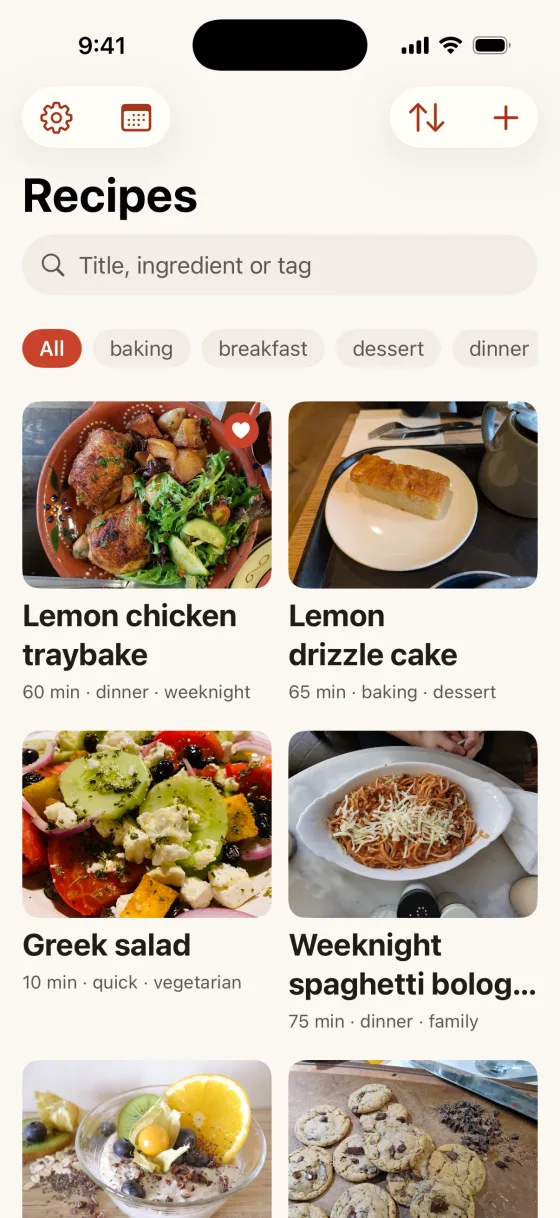
Find any recipe in seconds
Search by ingredient, tag or title. Type in family recipes and add a photo from your library, so they are found the same way.
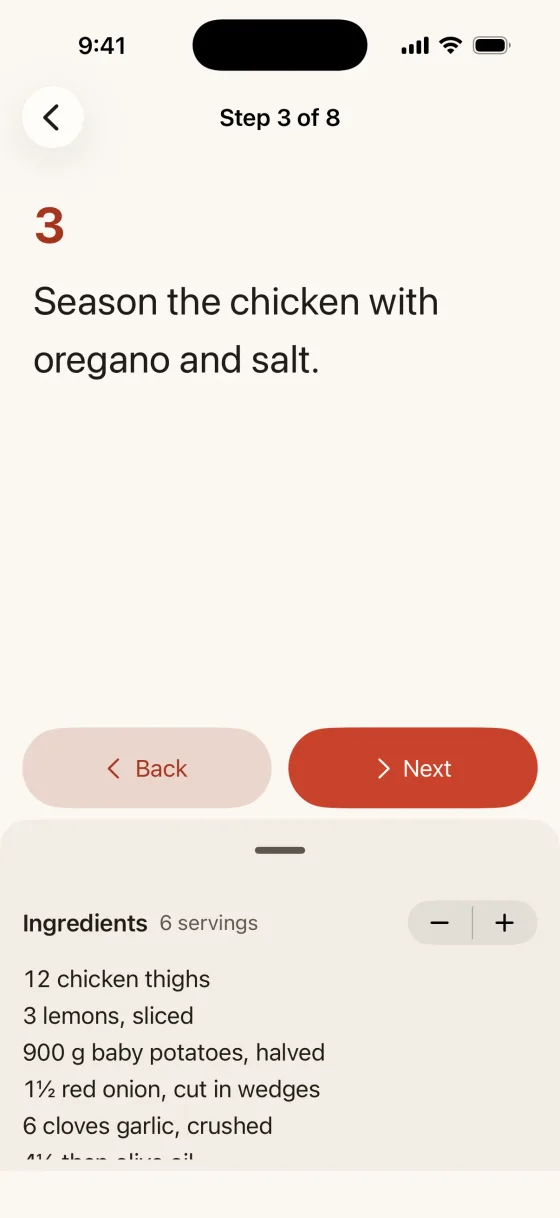
Cook from a screen that stays awake
Cook mode keeps the screen on and shows one step at a time, with the ingredients a tap away, scaled for the number of people at the table.
Print or share a clean card
Ingredients, steps and the source link on one card, ready to print or send.
Plan the week, get the list
Pro adds a weekly meal planner, a shopping list built from the plan and grouped by aisle, and themes.
Saving, link import, search, tags, scaling, cook mode, print and export are free with no limits and no account. Nothing you save is ever locked behind a purchase. Pro adds a weekly meal planner, a shopping list and themes. Details on data are in the privacy policy.
How it works
Paste a link or share a page
Tap Add, then Paste a link, or tap Share on a recipe page in Safari and choose Recipe Keeper. You can also type a recipe in.
Check the preview and save
The preview shows the photo, title, source and the number of ingredients and steps. Tap Save, or edit it first.
Find it and cook
Search by ingredient, tag or title, set the servings, and tap Cook. The screen stays awake, one step at a time.
Price
Free
$0
Saving, link import, search, tags, scaling, cook mode, print and export, with no limits.
Pro Monthly
$4.99a month
Weekly meal planner, shopping list by aisle and themes. Renews automatically unless cancelled.
Pro Lifetime
$14.99once
Weekly meal planner, shopping list by aisle and themes, paid once. Never renews.
Requires iPhone with iOS 26 or later. English, German.
Questions and answers
What is Recipe Keeper: Save & Cook?
Recipe Keeper: Save & Cook is a recipe keeper for iPhone. It saves recipes from a pasted link, the Safari share sheet or typed text, finds them by ingredient, tag or title, scales quantities, keeps the screen awake in cook mode, prints a clean card and exports the whole collection. On the Home Screen it is called Recipe Keeper. It is made by Winton Gee.
How much does it cost?
Saving, link import, search, tags, scaling, cook mode, print and export are free, with no limits. Pro is $4.99 a month or $14.99 once. Prices vary by country. There is no free trial; the free version is the way to try it.
What is free, and what does Pro add?
Everything you need to keep and cook from your recipes is free, with no limits: saving, link import, search, tags, scaling, cook mode, print and export. Nothing you save is ever locked behind a purchase. Pro adds a weekly meal planner, a shopping list built from the plan and grouped by aisle, and themes.
Does it work with every recipe site?
It works with most recipe sites: the app reads the recipe data that most recipe pages publish, and shows you what it found before you save. If a page has no recipe data, share the page from Safari or paste the recipe text. Video and social links are saved as link cards with the page title; the app does not import the recipe from a video.
Do I need an account? Where are my recipes stored?
No account. Your recipes, photos, plans and lists are stored on your iPhone in the app's own storage, and are included in your iPhone backup. There is no server of ours and no analytics, and nothing you save is uploaded or published.
Can I get my recipes out?
Yes, any time and for free. In the app's Settings, Export all recipes writes a zip of Markdown and JSON files with your photos, which any computer can open without this app. Import an export brings it back, on this iPhone or a new one.
How do I cancel or restore Pro?
To cancel, open the Settings app, tap your name, then Subscriptions, choose Recipe Keeper: Save & Cook and tap Cancel Subscription, at least 24 hours before the period ends. To restore on a new iPhone, open the app's Settings and tap Restore purchases. Pro Lifetime is a one-time purchase, so there is nothing to cancel.
More questions? Visit support or email wintongee@gmail.com.
Guides
Plain, sourced help with saving recipes from websites on iPhone and keeping a copy of them.
Keep every recipe you cook from
Recipe Keeper: Save & Cook is not on the App Store yet. This page will link to it as soon as it is.
Coming soon to the App Store